> ## Documentation Index
> Fetch the complete documentation index at: https://docs.instaforge.app/llms.txt
> Use this file to discover all available pages before exploring further.
# The calendar
> Every appointment in one calendar, with blocked time, the waiting list and the booking settings.
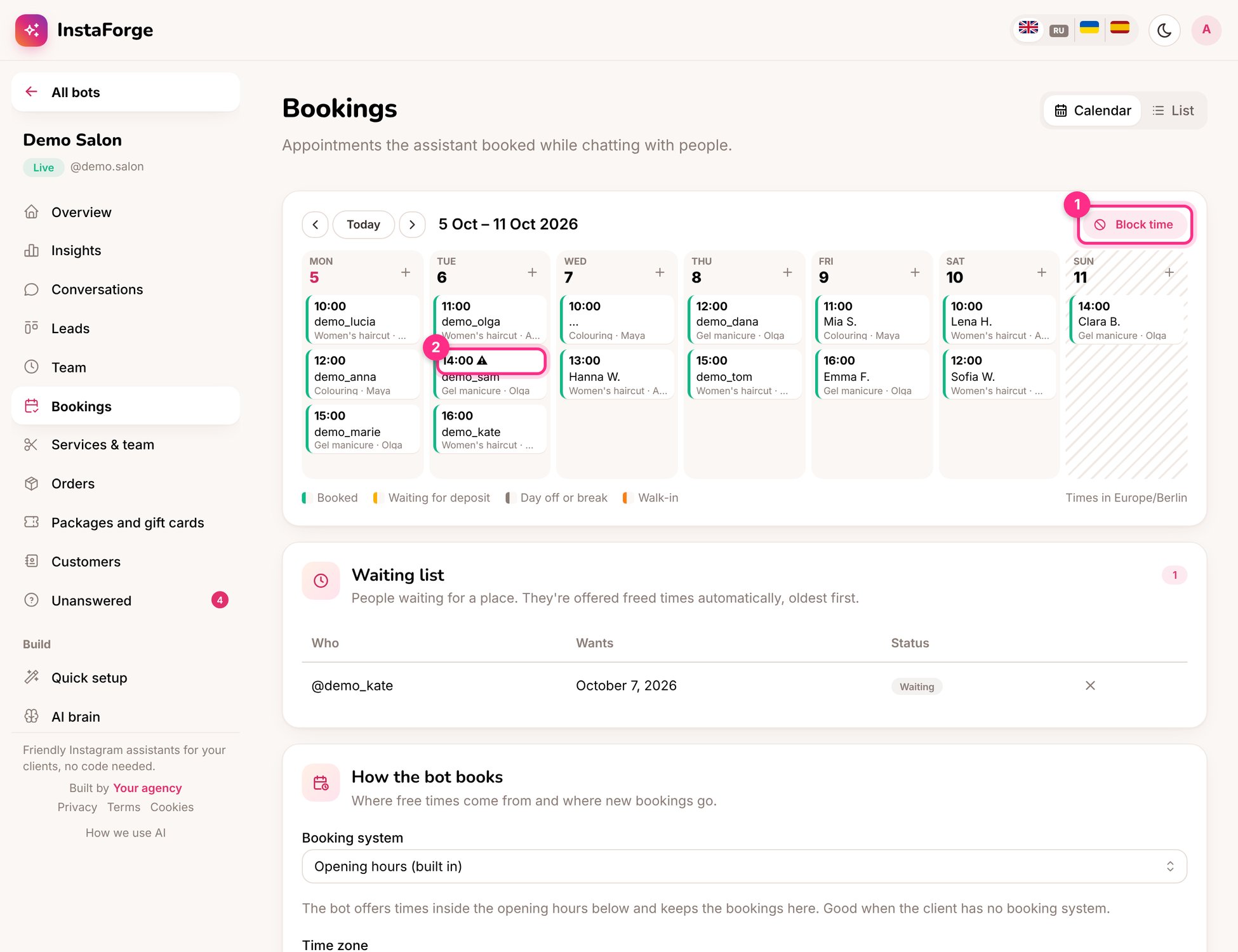
**Bookings** shows the week's appointments by day, with the service and who does it. A warning sign marks appointments that haven't been confirmed yet.
 ## Everyday tasks
| To do this | Do this |
| - | - |
| Book someone by hand | Click a free time in the calendar |
| Cancel an appointment | Open it and click **Cancel**. The person is told, and the time goes to the waiting list |
| Close for a holiday or a break | **Block time** (1), for everyone or one team member |
| Mark a no-show | Open it after the time and click **Didn't come** |
| See a list instead | Switch from **Calendar** to **List** |
## Where free times come from
Under **How the bot books** choose the booking system:
| Booking system | How it works |
| - | - |
| Opening hours (built in) | Free times inside the opening hours, bookings kept here. Good when the client has no booking system |
| Google Calendar | Free times from the client's Google Calendar; each booking becomes an event |
| YCLIENTS, Altegio | Free times and bookings go straight to the client's account |
You also set the opening hours, the length of a time slot, how much notice is needed and how far ahead people can book.
All times are shown in the business's time zone, wherever you are.
This documentation is built and hosted on [Mintlify](https://mintlify.com), a developer documentation platform.
## Everyday tasks
| To do this | Do this |
| - | - |
| Book someone by hand | Click a free time in the calendar |
| Cancel an appointment | Open it and click **Cancel**. The person is told, and the time goes to the waiting list |
| Close for a holiday or a break | **Block time** (1), for everyone or one team member |
| Mark a no-show | Open it after the time and click **Didn't come** |
| See a list instead | Switch from **Calendar** to **List** |
## Where free times come from
Under **How the bot books** choose the booking system:
| Booking system | How it works |
| - | - |
| Opening hours (built in) | Free times inside the opening hours, bookings kept here. Good when the client has no booking system |
| Google Calendar | Free times from the client's Google Calendar; each booking becomes an event |
| YCLIENTS, Altegio | Free times and bookings go straight to the client's account |
You also set the opening hours, the length of a time slot, how much notice is needed and how far ahead people can book.
All times are shown in the business's time zone, wherever you are.
This documentation is built and hosted on [Mintlify](https://mintlify.com), a developer documentation platform.