> ## Documentation Index
> Fetch the complete documentation index at: https://docs.instaforge.app/llms.txt
> Use this file to discover all available pages before exploring further.
# Services and team
> The service menu, how long each takes, what it costs, and who does what.
**Services & team** is the menu customers book from, and the people they book with. Free times always match how long the service takes and who can do it.
 ## Set up the menu
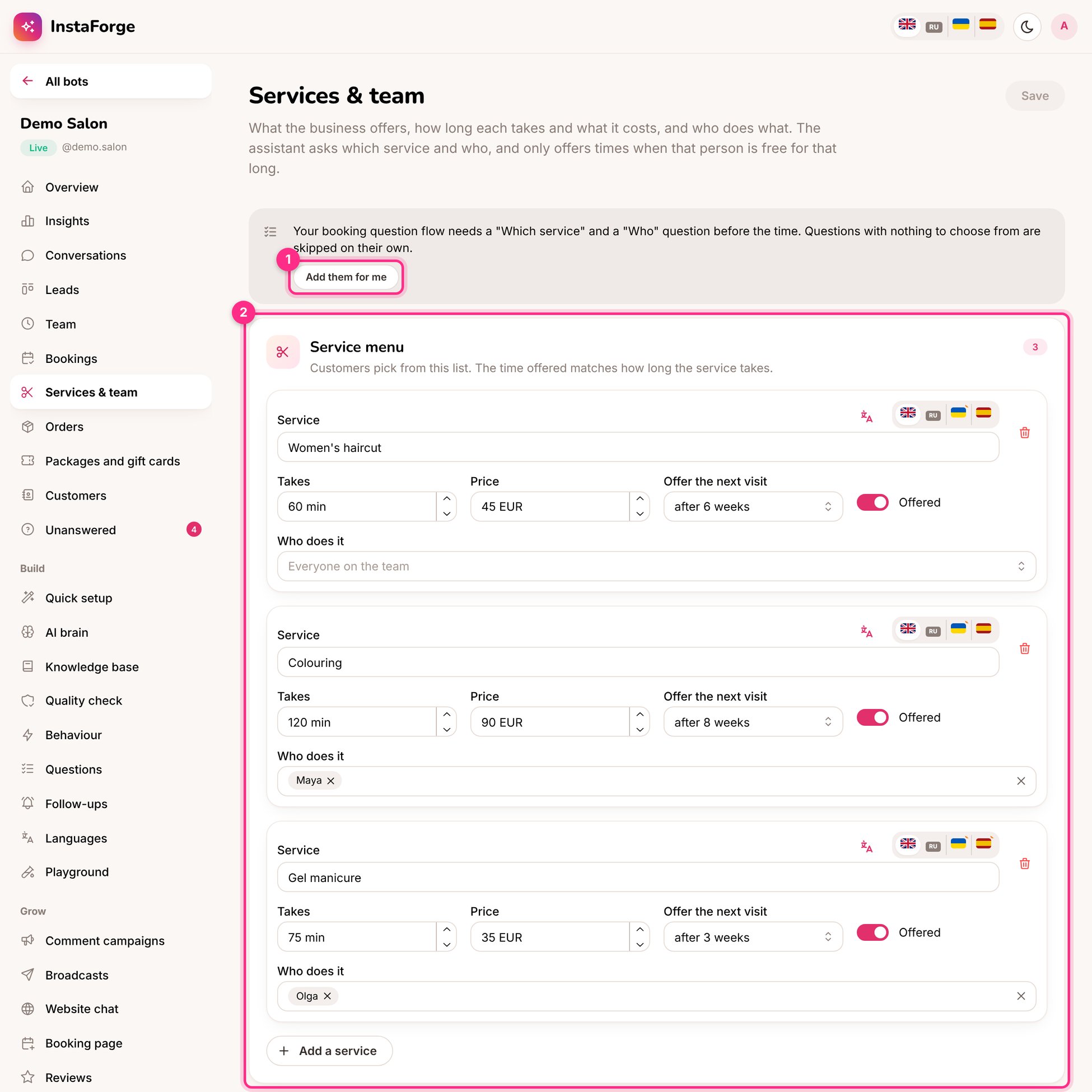
Name (in each language), how long it takes, the price, and who does it. Leave **Who does it** empty if anyone can.
For example 6 weeks for a haircut. That many weeks after a visit, the assistant offers the next one. See [Waiting list, reminders and extras](/bookings/waiting-list-and-extras).
Each person can take bookings or not, and can have their own working hours (otherwise the business's opening hours are used). Each person's appointments are kept apart, so two people can be booked at the same time.
If the booking question flow doesn't ask **which service** and **who** before the time, the page offers **Add them for me**.
## Calendar links
At the bottom of the page each team member gets a private calendar link. Added to Google Calendar, Apple Calendar or Outlook, it shows their appointments on their phone and keeps itself up to date.
Calendar links show customers' names and phone numbers. Give each person only their own link. **Make new links** turns off every old link, for example when someone leaves the team.
This documentation is built and hosted on [Mintlify](https://mintlify.com), a developer documentation platform.
## Set up the menu
Name (in each language), how long it takes, the price, and who does it. Leave **Who does it** empty if anyone can.
For example 6 weeks for a haircut. That many weeks after a visit, the assistant offers the next one. See [Waiting list, reminders and extras](/bookings/waiting-list-and-extras).
Each person can take bookings or not, and can have their own working hours (otherwise the business's opening hours are used). Each person's appointments are kept apart, so two people can be booked at the same time.
If the booking question flow doesn't ask **which service** and **who** before the time, the page offers **Add them for me**.
## Calendar links
At the bottom of the page each team member gets a private calendar link. Added to Google Calendar, Apple Calendar or Outlook, it shows their appointments on their phone and keeps itself up to date.
Calendar links show customers' names and phone numbers. Give each person only their own link. **Make new links** turns off every old link, for example when someone leaves the team.
This documentation is built and hosted on [Mintlify](https://mintlify.com), a developer documentation platform.