> ## Documentation Index
> Fetch the complete documentation index at: https://docs.instaforge.app/llms.txt
> Use this file to discover all available pages before exploring further.
# Question flows
> Questions the assistant asks and remembers, like a name, a phone number or a preferred time.
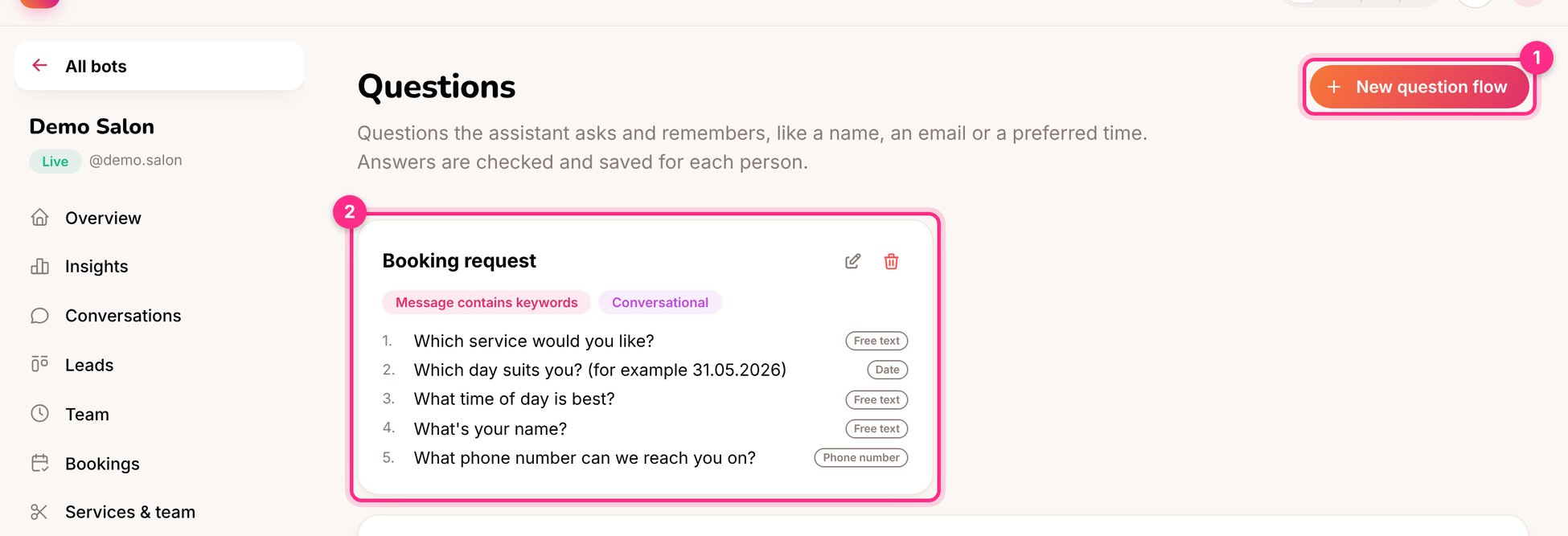
A question flow is a short list of questions the assistant asks and saves for each person: a booking request, an order, a new-client form. Answers are checked (a phone number must look like one) and saved on the person's profile.
 ## Create a flow
Name it, and choose when it **starts**: the person's first message, a message containing keywords, or a Behaviour rule.
* **Conversational:** people can ask other things in between; the assistant answers, then asks the next question again.
* **Step by step:** every message is the answer to the current question. Best for forms.
For each one choose the answer type:
| Type | Use it for |
| - | - |
| Free text, Number | Names, notes, quantities |
| Email, Phone number | Checked automatically |
| Multiple choice, Yes / No | Shown as tap-to-answer buttons |
| Date | Understands "tomorrow" and "31.05" |
| Service, Who | From the menu on **Services and team** |
| Booking time | Offers free times and books the one picked |
The webhook sends the answers as JSON to Zapier, Make or a CRM when the flow is finished.
For bookings, put **Service** and **Who** before **Booking time**, so the free times match how long the service takes and who does it. The Services page offers to add them for you.
## Ideas
* **Onboarding for a coach:** name, goal, experience level, budget, then a consultation time.
* **Restaurant reservation:** date, time, number of guests, any allergies.
* **Wholesale enquiry for a shop:** company name, email, products, quantities. Send it to the CRM with the webhook.
This documentation is built and hosted on [Mintlify](https://mintlify.com), a developer documentation platform.
## Create a flow
Name it, and choose when it **starts**: the person's first message, a message containing keywords, or a Behaviour rule.
* **Conversational:** people can ask other things in between; the assistant answers, then asks the next question again.
* **Step by step:** every message is the answer to the current question. Best for forms.
For each one choose the answer type:
| Type | Use it for |
| - | - |
| Free text, Number | Names, notes, quantities |
| Email, Phone number | Checked automatically |
| Multiple choice, Yes / No | Shown as tap-to-answer buttons |
| Date | Understands "tomorrow" and "31.05" |
| Service, Who | From the menu on **Services and team** |
| Booking time | Offers free times and books the one picked |
The webhook sends the answers as JSON to Zapier, Make or a CRM when the flow is finished.
For bookings, put **Service** and **Who** before **Booking time**, so the free times match how long the service takes and who does it. The Services page offers to add them for you.
## Ideas
* **Onboarding for a coach:** name, goal, experience level, budget, then a consultation time.
* **Restaurant reservation:** date, time, number of guests, any allergies.
* **Wholesale enquiry for a shop:** company name, email, products, quantities. Send it to the CRM with the webhook.
This documentation is built and hosted on [Mintlify](https://mintlify.com), a developer documentation platform.