> ## Documentation Index
> Fetch the complete documentation index at: https://docs.instaforge.app/llms.txt
> Use this file to discover all available pages before exploring further.
# Customer dates and morning brief
> Birthdays, passports, trips and payments on each customer, and a brief every morning with messages ready to send.
Keep the dates that matter on each customer: birthdays (theirs and their children's), anniversaries, when a passport expires, trips and payment deadlines. Every morning the team gets a brief of what's due today, plus customers who haven't written for a while, each with a message the AI drafted. Someone on the team sends it, edits it or skips it. Nothing reaches a customer by itself.
## Add dates to a customer
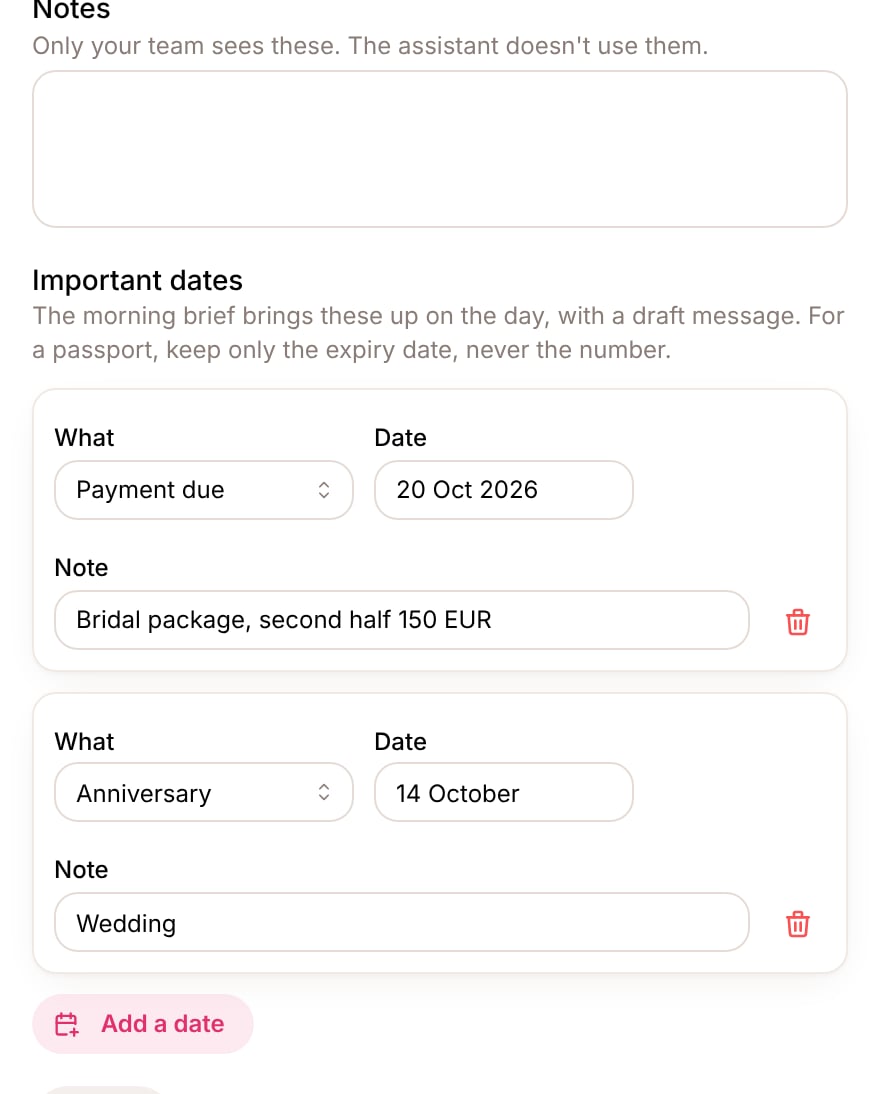
Open **Customers**, click a customer and scroll to **Important dates**. Click **Add a date**, choose what it is, pick the date and add a short note if it helps.
 | What | When it comes up | Example note |
| - | - | - |
| Birthday | Every year on the day | |
| Child's birthday | Every year on the day | The child's name |
| Anniversary | Every year on the day | Wedding |
| Passport expires | 90 days before (you can change it) | Only the date |
| Trip | The day before it starts, and the day after it ends | Lisbon, 2 adults |
| Payment due | 3 days before (you can change it) | Second payment, 1,200 USD |
| Other | On the day | Visa appointment |
Keep only the date a passport expires, never its number. A note that looks like a document number is refused.
Yearly dates show only the day and month, so the year doesn't matter.
## The morning brief
Switch it on in **Morning brief → Settings** and choose the time it arrives, in the business's time zone. The settings are for the whole business.
| What | When it comes up | Example note |
| - | - | - |
| Birthday | Every year on the day | |
| Child's birthday | Every year on the day | The child's name |
| Anniversary | Every year on the day | Wedding |
| Passport expires | 90 days before (you can change it) | Only the date |
| Trip | The day before it starts, and the day after it ends | Lisbon, 2 adults |
| Payment due | 3 days before (you can change it) | Second payment, 1,200 USD |
| Other | On the day | Visa appointment |
Keep only the date a passport expires, never its number. A note that looks like a document number is refused.
Yearly dates show only the day and month, so the year doesn't matter.
## The morning brief
Switch it on in **Morning brief → Settings** and choose the time it arrives, in the business's time zone. The settings are for the whole business.
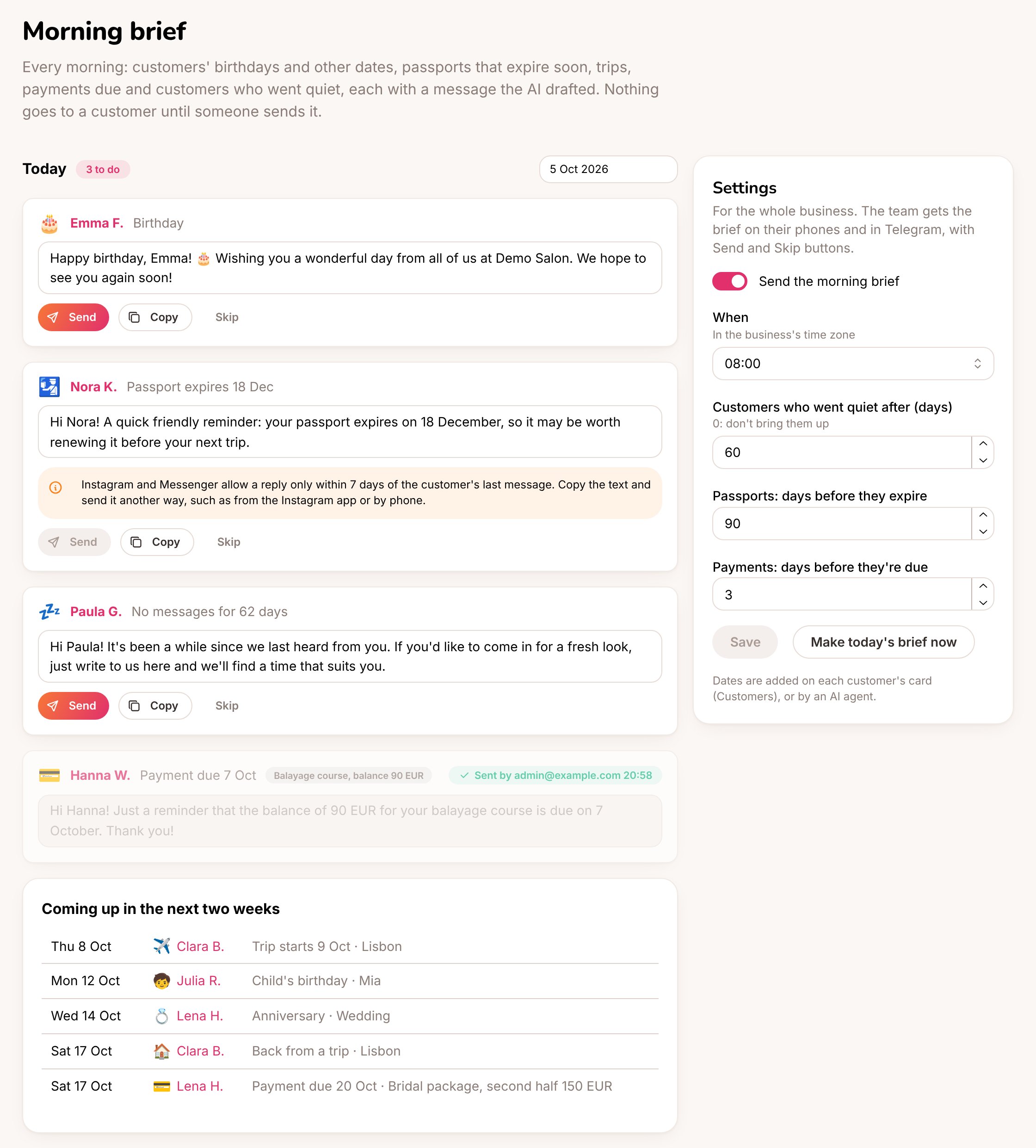 Each item shows the customer, what the occasion is and the AI's message, written in the customer's language and the assistant's style. You can change the text before sending.
* **Send** sends it in the customer's chat, as a message from the team.
* **Copy** copies the text, to send it some other way.
* **Skip** takes it off the list.
Each occasion comes up once. **Coming up in the next two weeks** shows what's next, and **Make today's brief now** adds anything new straight away instead of waiting for the morning.
### Customers who went quiet
Customers who haven't written for 60 days (you can change it; 0 turns it off) come up once, with a friendly check-in. People who asked for no marketing messages are left out. At most 10 a day.
### When a message can't be sent from here
Each channel has its own rules, and the brief follows them:
| Channel | Send works |
| - | - |
| Website chat, Telegram | Always |
| Instagram, Messenger | Within 7 days of the customer's last message |
| WhatsApp | Within 24 hours of the customer's last message |
| Booked on the booking page | No chat to write in |
When **Send** isn't possible, the item says why. Copy the text and send it another way, for example from the Instagram app or by phone.
The business owner sees the brief in their portal too (with the **Customers** section on) and can send or skip items.
## On your phone and in Telegram
The people who answer chats get a notification with how many items there are. In Telegram each item arrives as its own message with **Send**, **Skip** and **Edit** buttons, so a manager can work through the brief from their phone. **Edit** opens the item on the page. Turn it off under **Settings → Notifications** (**The morning brief**).
Telegram alerts need the agency's Telegram bot. See [Alerts and notifications](/conversations-and-customers/alerts).
An AI agent can do this too: `update_customer` with `dates` adds dates, `set_morning_brief` changes the settings, `morning_brief` shows the day's items and `brief_action` sends or skips one. See [AI agents (MCP)](/running-the-agency/ai-agents).
This documentation is built and hosted on [Mintlify](https://mintlify.com), a developer documentation platform.
Each item shows the customer, what the occasion is and the AI's message, written in the customer's language and the assistant's style. You can change the text before sending.
* **Send** sends it in the customer's chat, as a message from the team.
* **Copy** copies the text, to send it some other way.
* **Skip** takes it off the list.
Each occasion comes up once. **Coming up in the next two weeks** shows what's next, and **Make today's brief now** adds anything new straight away instead of waiting for the morning.
### Customers who went quiet
Customers who haven't written for 60 days (you can change it; 0 turns it off) come up once, with a friendly check-in. People who asked for no marketing messages are left out. At most 10 a day.
### When a message can't be sent from here
Each channel has its own rules, and the brief follows them:
| Channel | Send works |
| - | - |
| Website chat, Telegram | Always |
| Instagram, Messenger | Within 7 days of the customer's last message |
| WhatsApp | Within 24 hours of the customer's last message |
| Booked on the booking page | No chat to write in |
When **Send** isn't possible, the item says why. Copy the text and send it another way, for example from the Instagram app or by phone.
The business owner sees the brief in their portal too (with the **Customers** section on) and can send or skip items.
## On your phone and in Telegram
The people who answer chats get a notification with how many items there are. In Telegram each item arrives as its own message with **Send**, **Skip** and **Edit** buttons, so a manager can work through the brief from their phone. **Edit** opens the item on the page. Turn it off under **Settings → Notifications** (**The morning brief**).
Telegram alerts need the agency's Telegram bot. See [Alerts and notifications](/conversations-and-customers/alerts).
An AI agent can do this too: `update_customer` with `dates` adds dates, `set_morning_brief` changes the settings, `morning_brief` shows the day's items and `brief_action` sends or skips one. See [AI agents (MCP)](/running-the-agency/ai-agents).
This documentation is built and hosted on [Mintlify](https://mintlify.com), a developer documentation platform.