> ## Documentation Index
> Fetch the complete documentation index at: https://docs.instaforge.app/llms.txt
> Use this file to discover all available pages before exploring further.
# Connect Instagram
> Link the client's Instagram professional account with Meta's official login.
InstaForge uses Meta's official Instagram API, so the client logs in with Instagram and approves access. Nobody shares a password.
## Before you start
* The account must be an **Instagram Business or Creator** account.
* In the Instagram app, go to **Settings → Messages and story replies → Message controls → Connected tools** and allow access to messages.
* Your agency's Meta app must have the Instagram product with Instagram login set up (done once by an admin).
## Connect the account
In the bot menu, open **Instagram**.
The client logs in and approves. If the client isn't with you, copy the link and send it to them; it works from their phone.
The page shows the connected username. The assistant starts answering as soon as the bot is **Live**.
 ## One-time Meta app settings (admins)
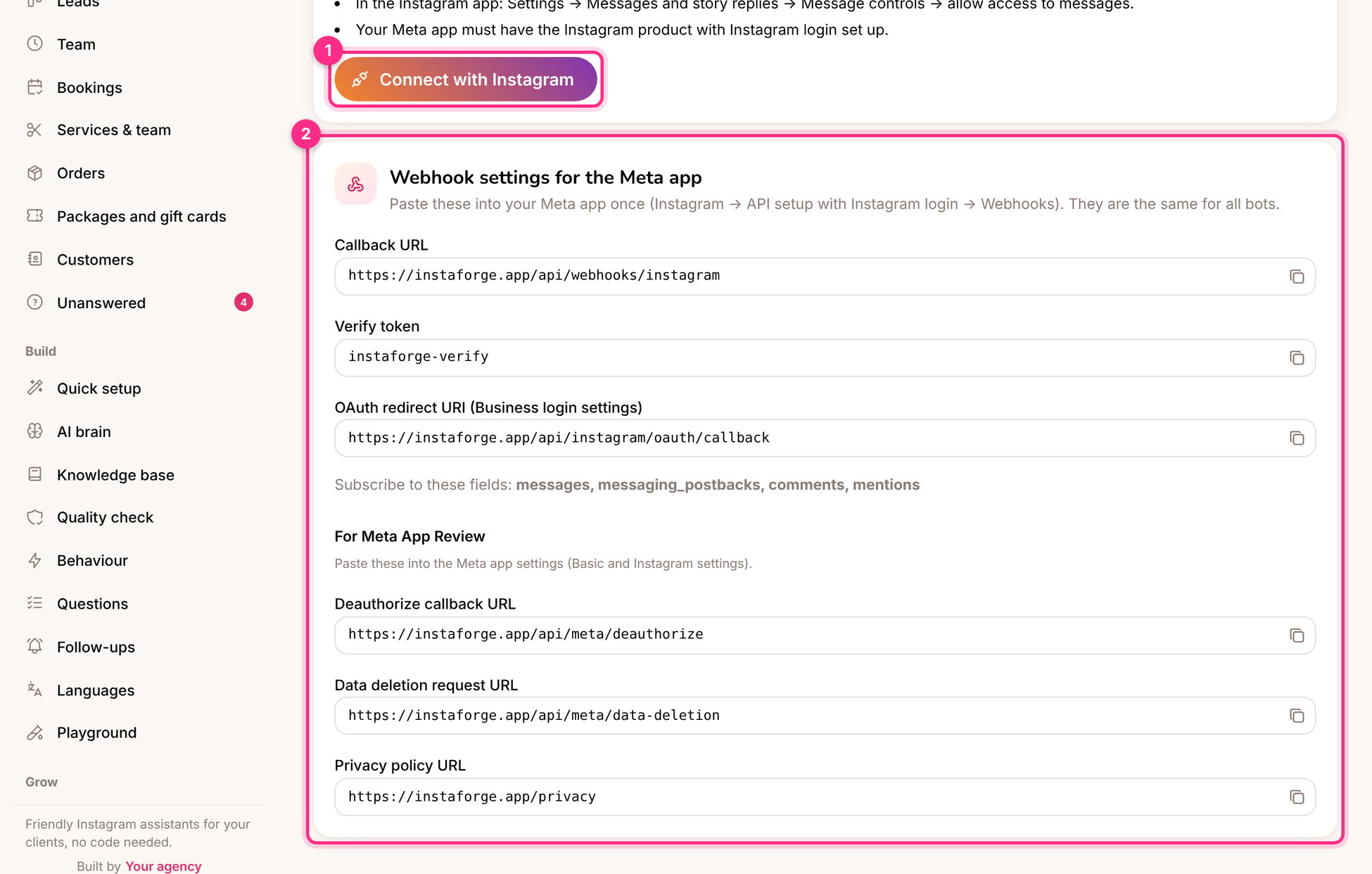
The **Webhook settings for the Meta app** box (2) lists the callback URL, the verify token and the redirect address to paste into your Meta app once, and the fields to subscribe to. The same box lists the addresses Meta asks for during App Review: the deauthorize callback, the data deletion URL and the privacy policy.
While your Meta app is in review, use the [playground](/build-the-assistant/playground) and the [website chat](/grow-sales/website-chat). Neither needs Meta's approval.
## Troubleshooting
The Meta app is still in development mode and the person isn't added as a tester. Add their Instagram account as an Instagram tester in the Meta app, or finish App Review.
Check that the bot is **Live**, that an AI service is connected on **AI brain**, and that the person hasn't been handed to the team (the conversation shows a **Human** badge).
Instagram tokens are renewed automatically. If the client changed their password or removed the app, connect again from the same page.
This documentation is built and hosted on [Mintlify](https://mintlify.com), a developer documentation platform.
## One-time Meta app settings (admins)
The **Webhook settings for the Meta app** box (2) lists the callback URL, the verify token and the redirect address to paste into your Meta app once, and the fields to subscribe to. The same box lists the addresses Meta asks for during App Review: the deauthorize callback, the data deletion URL and the privacy policy.
While your Meta app is in review, use the [playground](/build-the-assistant/playground) and the [website chat](/grow-sales/website-chat). Neither needs Meta's approval.
## Troubleshooting
The Meta app is still in development mode and the person isn't added as a tester. Add their Instagram account as an Instagram tester in the Meta app, or finish App Review.
Check that the bot is **Live**, that an AI service is connected on **AI brain**, and that the person hasn't been handed to the team (the conversation shows a **Human** badge).
Instagram tokens are renewed automatically. If the client changed their password or removed the app, connect again from the same page.
This documentation is built and hosted on [Mintlify](https://mintlify.com), a developer documentation platform.