> ## Documentation Index
> Fetch the complete documentation index at: https://docs.instaforge.app/llms.txt
> Use this file to discover all available pages before exploring further.
# What the assistant earned
> The money each assistant brought the business, the hours it saved the team and the ads that started paying chats.
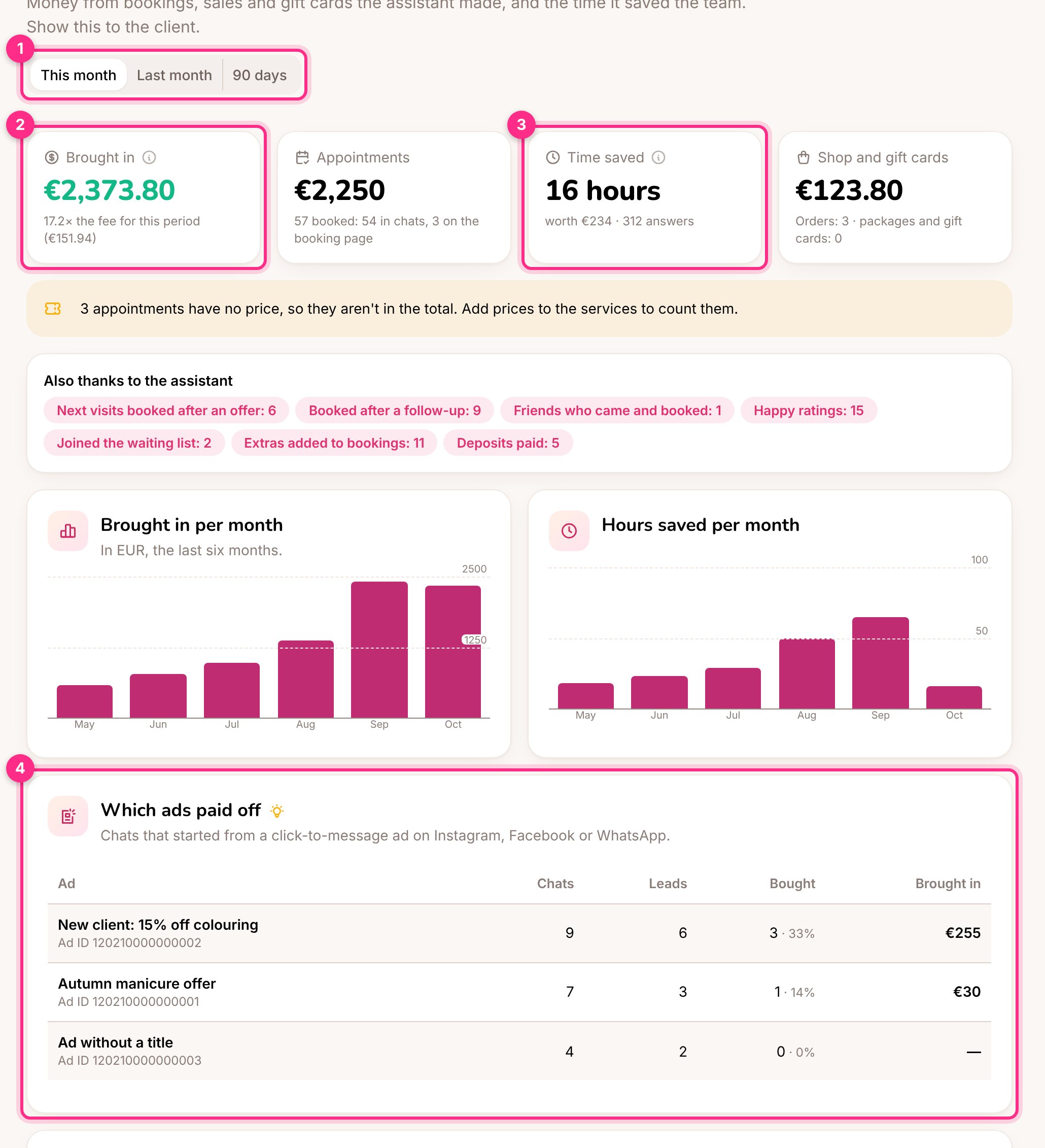
Every assistant has an **Earnings** page: the money it brought the business and the hours of the team's time it saved. The business owner sees it in their portal too, under **Earnings**.
 ## What's counted
| Counted | Not counted |
| - | - |
| Appointments booked in a chat or on the booking page, at the service's price | Appointments the team added by hand, cancelled ones and no-shows |
| Shop orders from a chat or the shop page, once paid | Orders that were never paid |
| Packages and gift cards sold in a chat | Cards the team sold in person |
The total is split by currency. When a booked service has no price, the page says how many appointments were left out: add prices on the **Services & team** page and they count from then on.
**Also thanks to the assistant** lists the wins that aren't money on their own: next visits booked after an offer, people who booked after a follow-up, friends who came through an invitation, happy ratings, extras added to bookings and deposits paid.
## Time saved
Every answer the assistant sent instead of a person counts as a few minutes of someone's time. At the bottom of the page (team only):
* **Minutes per answer**: how long a person would take to answer one message. 2 minutes is a fair start.
* **Cost of an hour of the team's time**: with a value here, the hours saved also show as money. Leave 0 to show hours only.
When the client has a monthly fee set on the **Billing** page, the page also shows how many times the fee the assistant brought back in the period, in the same currency.
## Which ads paid off
When someone writes after tapping a click-to-message ad on Instagram, Facebook or WhatsApp, Meta tells us which ad it was. **Which ads paid off** (4) shows, per ad:
* **Chats**: people who wrote from it.
* **Leads**: how many of them left their details or reached the lead board.
* **Bought**: how many booked or bought anything since, and what share of the chats that is.
* **Brought in**: what they spent: appointments, orders, packages and gift cards.
Ads Meta didn't identify are grouped in one row. Only sums and counts are shown here, never who bought what.
Put more budget on the ad with the best **Bought** share, not the one with the most chats. A cheap ad that brings browsers costs more than it looks.
## In the monthly report
The monthly report email also says how many people wrote from an ad and about how many hours the assistant saved the team. See [Reports and connections](/running-the-agency/reports-and-connections).
This documentation is built and hosted on [Mintlify](https://mintlify.com), a developer documentation platform.
## What's counted
| Counted | Not counted |
| - | - |
| Appointments booked in a chat or on the booking page, at the service's price | Appointments the team added by hand, cancelled ones and no-shows |
| Shop orders from a chat or the shop page, once paid | Orders that were never paid |
| Packages and gift cards sold in a chat | Cards the team sold in person |
The total is split by currency. When a booked service has no price, the page says how many appointments were left out: add prices on the **Services & team** page and they count from then on.
**Also thanks to the assistant** lists the wins that aren't money on their own: next visits booked after an offer, people who booked after a follow-up, friends who came through an invitation, happy ratings, extras added to bookings and deposits paid.
## Time saved
Every answer the assistant sent instead of a person counts as a few minutes of someone's time. At the bottom of the page (team only):
* **Minutes per answer**: how long a person would take to answer one message. 2 minutes is a fair start.
* **Cost of an hour of the team's time**: with a value here, the hours saved also show as money. Leave 0 to show hours only.
When the client has a monthly fee set on the **Billing** page, the page also shows how many times the fee the assistant brought back in the period, in the same currency.
## Which ads paid off
When someone writes after tapping a click-to-message ad on Instagram, Facebook or WhatsApp, Meta tells us which ad it was. **Which ads paid off** (4) shows, per ad:
* **Chats**: people who wrote from it.
* **Leads**: how many of them left their details or reached the lead board.
* **Bought**: how many booked or bought anything since, and what share of the chats that is.
* **Brought in**: what they spent: appointments, orders, packages and gift cards.
Ads Meta didn't identify are grouped in one row. Only sums and counts are shown here, never who bought what.
Put more budget on the ad with the best **Bought** share, not the one with the most chats. A cheap ad that brings browsers costs more than it looks.
## In the monthly report
The monthly report email also says how many people wrote from an ad and about how many hours the assistant saved the team. See [Reports and connections](/running-the-agency/reports-and-connections).
This documentation is built and hosted on [Mintlify](https://mintlify.com), a developer documentation platform.