> ## Documentation Index
> Fetch the complete documentation index at: https://docs.instaforge.app/llms.txt
> Use this file to discover all available pages before exploring further.
# Google reviews
> Answer every Google review of the business: the AI drafts the reply in the reviewer's language, your team checks it and publishes it.
Reviews on Google Maps shape whether people choose the business, and answering them helps. Connect the business's Google profile to its assistant and every new review shows up in InstaForge with a reply already drafted. Someone on the team reads it, changes what they want and publishes it on Google as the owner's reply.
 ## Connect Google
An admin or editor does this once per assistant.
In the assistant's menu, open **Customers → Google reviews** and click **Connect Google**.
Use the Google account that owns or manages the business on Google Maps, and allow access. If the business is managed by someone else, ask them to add you as a manager of the profile first, or send them to do this step.
Back in InstaForge, pick the business from the list and click **Use this business**. Reviews come in within the hour, or click **Check now**.
A client with two branches can connect each branch's assistant to its own Google location.
## Reply to reviews
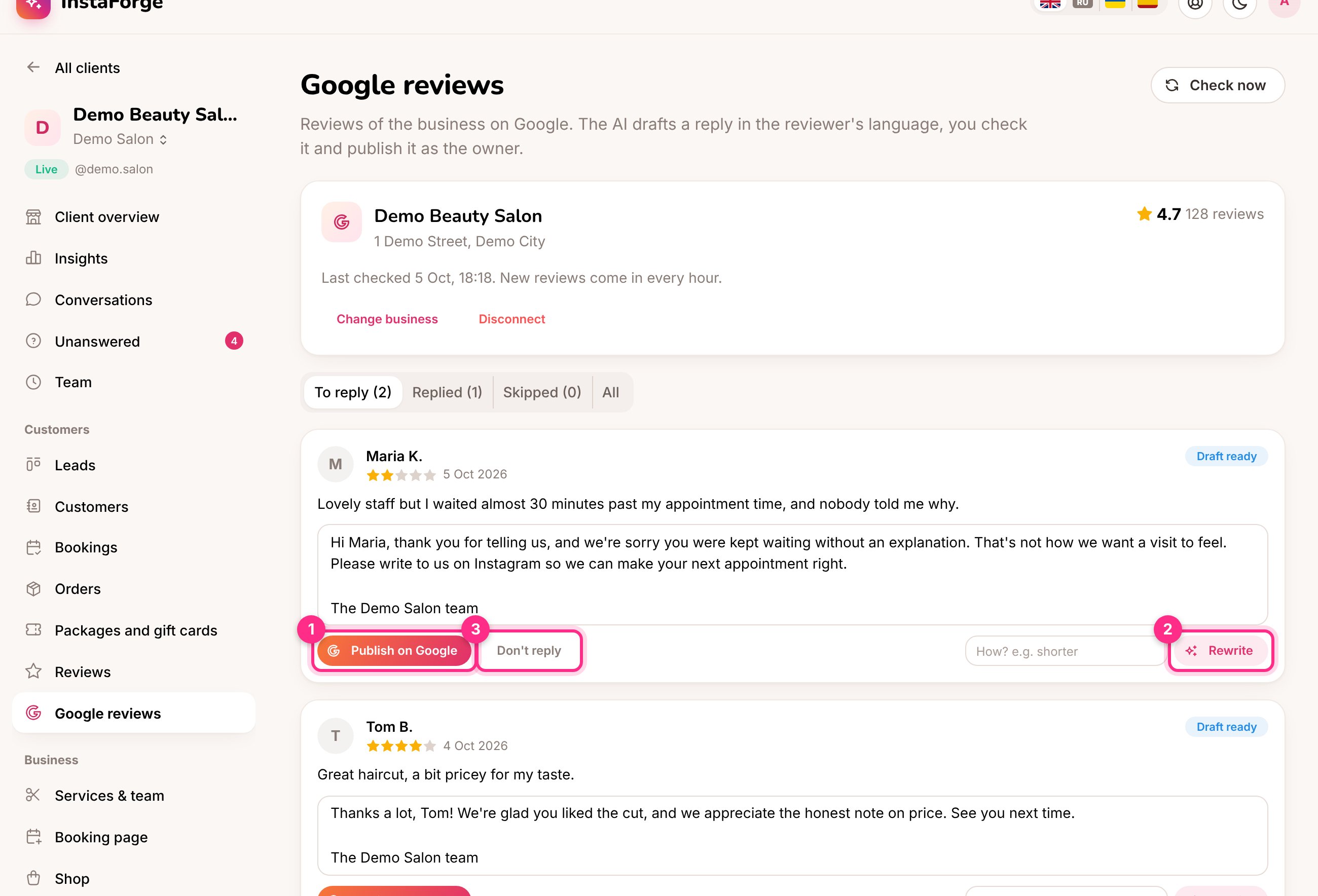
New reviews wait under **To reply**, each with a draft written in the language of the review. The AI uses the assistant's knowledge, so it can mention real things like opening hours, but it never mentions bookings, orders or anything personal, because replies are public.
* **Publish on Google** (1) posts the reply, exactly as it is in the box. Edit it first if you like.
* **Rewrite** (2) asks for a new draft. Type how in the box next to it, for example "shorter" or "mention we now open at 9".
* **Don't reply** (3) moves the review to **Skipped**. You can still answer it later.
A published reply can be edited or removed under **Replied**. Replies written directly on Google show up there too.
Old reviews from before you connected Google are brought in without drafts. Click **Draft with AI** on any you want to answer.
## How replies are written
## Connect Google
An admin or editor does this once per assistant.
In the assistant's menu, open **Customers → Google reviews** and click **Connect Google**.
Use the Google account that owns or manages the business on Google Maps, and allow access. If the business is managed by someone else, ask them to add you as a manager of the profile first, or send them to do this step.
Back in InstaForge, pick the business from the list and click **Use this business**. Reviews come in within the hour, or click **Check now**.
A client with two branches can connect each branch's assistant to its own Google location.
## Reply to reviews
New reviews wait under **To reply**, each with a draft written in the language of the review. The AI uses the assistant's knowledge, so it can mention real things like opening hours, but it never mentions bookings, orders or anything personal, because replies are public.
* **Publish on Google** (1) posts the reply, exactly as it is in the box. Edit it first if you like.
* **Rewrite** (2) asks for a new draft. Type how in the box next to it, for example "shorter" or "mention we now open at 9".
* **Don't reply** (3) moves the review to **Skipped**. You can still answer it later.
A published reply can be edited or removed under **Replied**. Replies written directly on Google show up there too.
Old reviews from before you connected Google are brought in without drafts. Click **Draft with AI** on any you want to answer.
## How replies are written
 | Setting | What it does |
| - | - |
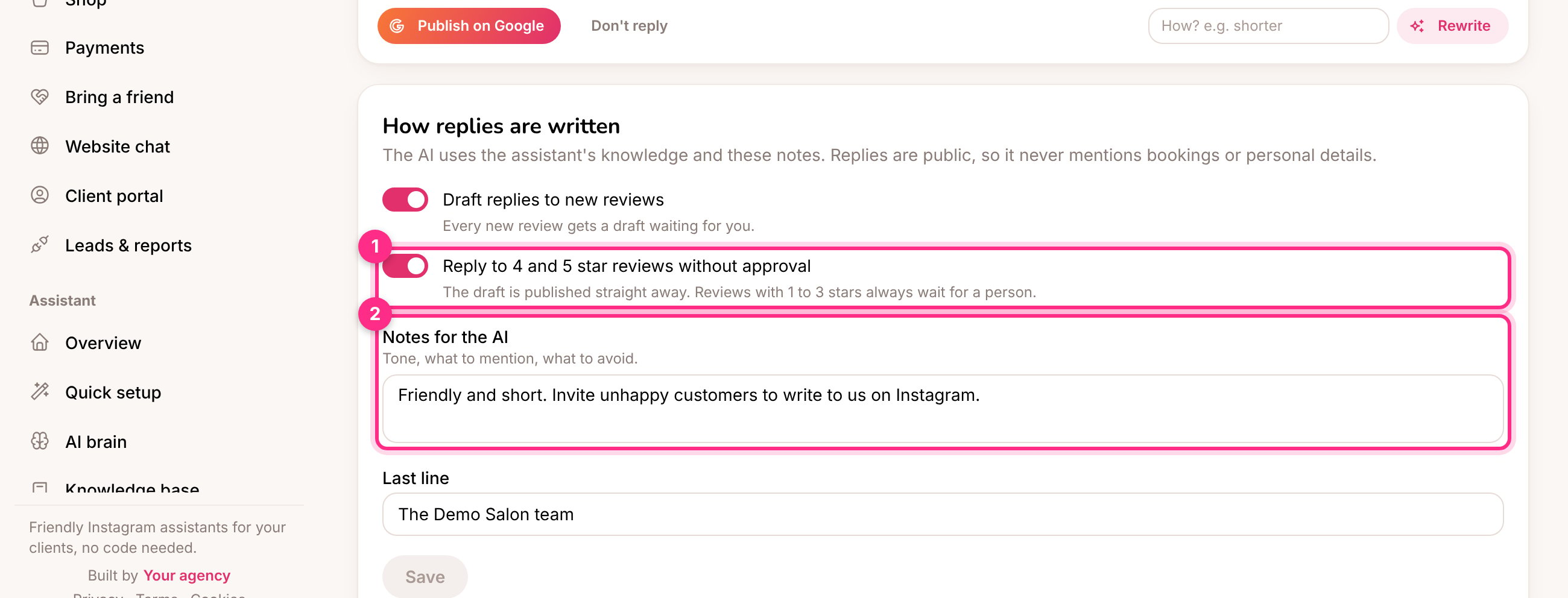
| Draft replies to new reviews | Every new review gets a draft. On by default |
| Reply to 4 and 5 star reviews without approval (1) | Good reviews are answered straight away. Reviews with 1 to 3 stars always wait for a person. Off by default |
| Notes for the AI (2) | The tone, what to mention, what to avoid. For example: invite unhappy customers to write to you on Instagram |
| Last line | Added to every reply, for example "The Demo Salon team" |
For unhappy reviews the AI apologises without arguing and invites the person to get in touch. It never promises refunds or discounts unless the assistant's knowledge offers them.
## The business owner approves the replies
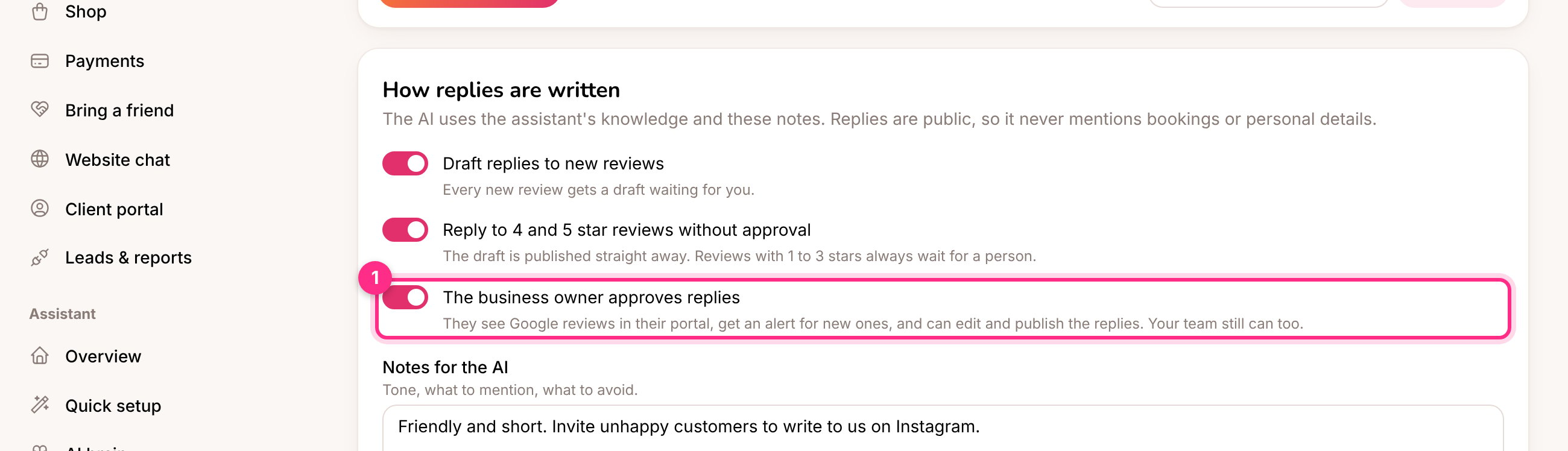
Many owners want the last word on what's said publicly in their name. Switch on **The business owner approves replies** (1) in the settings.
| Setting | What it does |
| - | - |
| Draft replies to new reviews | Every new review gets a draft. On by default |
| Reply to 4 and 5 star reviews without approval (1) | Good reviews are answered straight away. Reviews with 1 to 3 stars always wait for a person. Off by default |
| Notes for the AI (2) | The tone, what to mention, what to avoid. For example: invite unhappy customers to write to you on Instagram |
| Last line | Added to every reply, for example "The Demo Salon team" |
For unhappy reviews the AI apologises without arguing and invites the person to get in touch. It never promises refunds or discounts unless the assistant's knowledge offers them.
## The business owner approves the replies
Many owners want the last word on what's said publicly in their name. Switch on **The business owner approves replies** (1) in the settings.
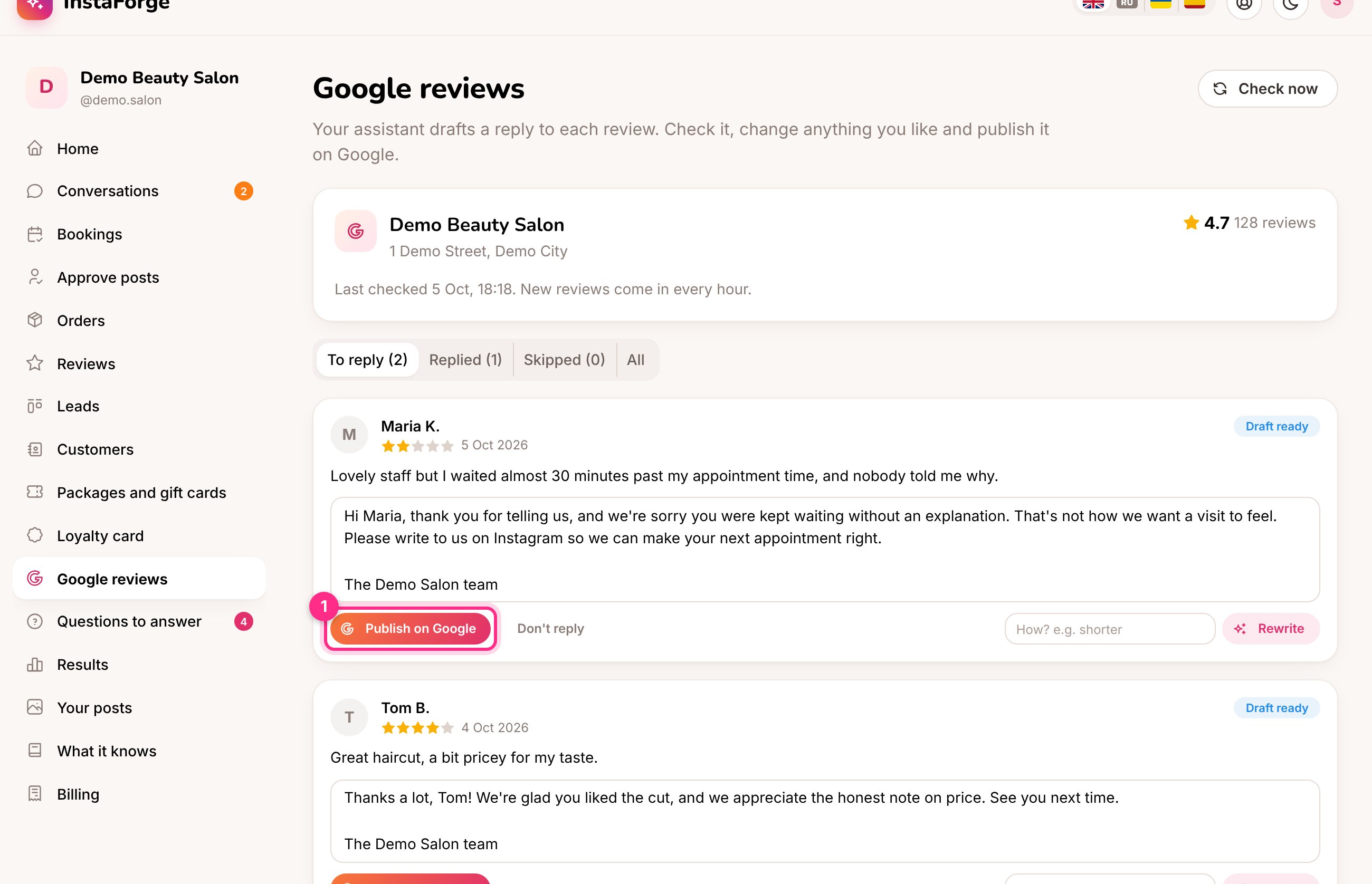
 The owner then has **Google reviews** in their [portal](/client-portal). They get an alert when new reviews come in, and their home page shows how many are waiting. They check each drafted reply, change it if they like and click **Publish on Google** (1). They can also rewrite a draft or leave a review without a reply. Your team can still publish too, so nothing waits if the owner is busy.
 The same switch is in **Client portal** settings, as **Google reviews**. Owners never see the connection or the settings.
## Alerts
When new reviews are waiting for a reply, the team gets one alert with how many there are and the lowest rating, and so does the business owner when they approve replies. Each person can switch it off in their own alert settings.
## Who can do what
| | Admin, editor | Agent | Business owner |
| - | - | - | - |
| See reviews and drafts | Yes | Yes | When they approve replies |
| Publish, rewrite, skip | Yes | Yes | When they approve replies |
| Connect Google, change the settings | Yes | No | No |
The platform owner needs to set up a Google sign-in client that Google has approved for its Business Profile API. Until then the page can't connect. The README has the steps.
Either Google's hourly limit was reached (it clears by itself), or the platform's Google project hasn't been approved for the Business Profile API yet.
The reviews and drafts are removed from InstaForge. Replies already published stay on Google.
Yes. A connected [AI agent](/running-the-agency/ai-agents) can list reviews, publish or rewrite replies, skip reviews and change the settings. Ask it to show you each reply before it publishes.
This documentation is built and hosted on [Mintlify](https://mintlify.com), a developer documentation platform.
The same switch is in **Client portal** settings, as **Google reviews**. Owners never see the connection or the settings.
## Alerts
When new reviews are waiting for a reply, the team gets one alert with how many there are and the lowest rating, and so does the business owner when they approve replies. Each person can switch it off in their own alert settings.
## Who can do what
| | Admin, editor | Agent | Business owner |
| - | - | - | - |
| See reviews and drafts | Yes | Yes | When they approve replies |
| Publish, rewrite, skip | Yes | Yes | When they approve replies |
| Connect Google, change the settings | Yes | No | No |
The platform owner needs to set up a Google sign-in client that Google has approved for its Business Profile API. Until then the page can't connect. The README has the steps.
Either Google's hourly limit was reached (it clears by itself), or the platform's Google project hasn't been approved for the Business Profile API yet.
The reviews and drafts are removed from InstaForge. Replies already published stay on Google.
Yes. A connected [AI agent](/running-the-agency/ai-agents) can list reviews, publish or rewrite replies, skip reviews and change the settings. Ask it to show you each reply before it publishes.
This documentation is built and hosted on [Mintlify](https://mintlify.com), a developer documentation platform.