> ## Documentation Index
> Fetch the complete documentation index at: https://docs.instaforge.app/llms.txt
> Use this file to discover all available pages before exploring further.
# Loyalty card
> Every few visits or orders earn a reward, like a paper stamp card, and the assistant tells customers how many stamps they have.
A loyalty card brings customers back without paid ads: "every 6th manicure is free" or "the 10th coffee is on us". InstaForge counts the stamps by itself from appointments and orders, so nobody has to carry a paper card.
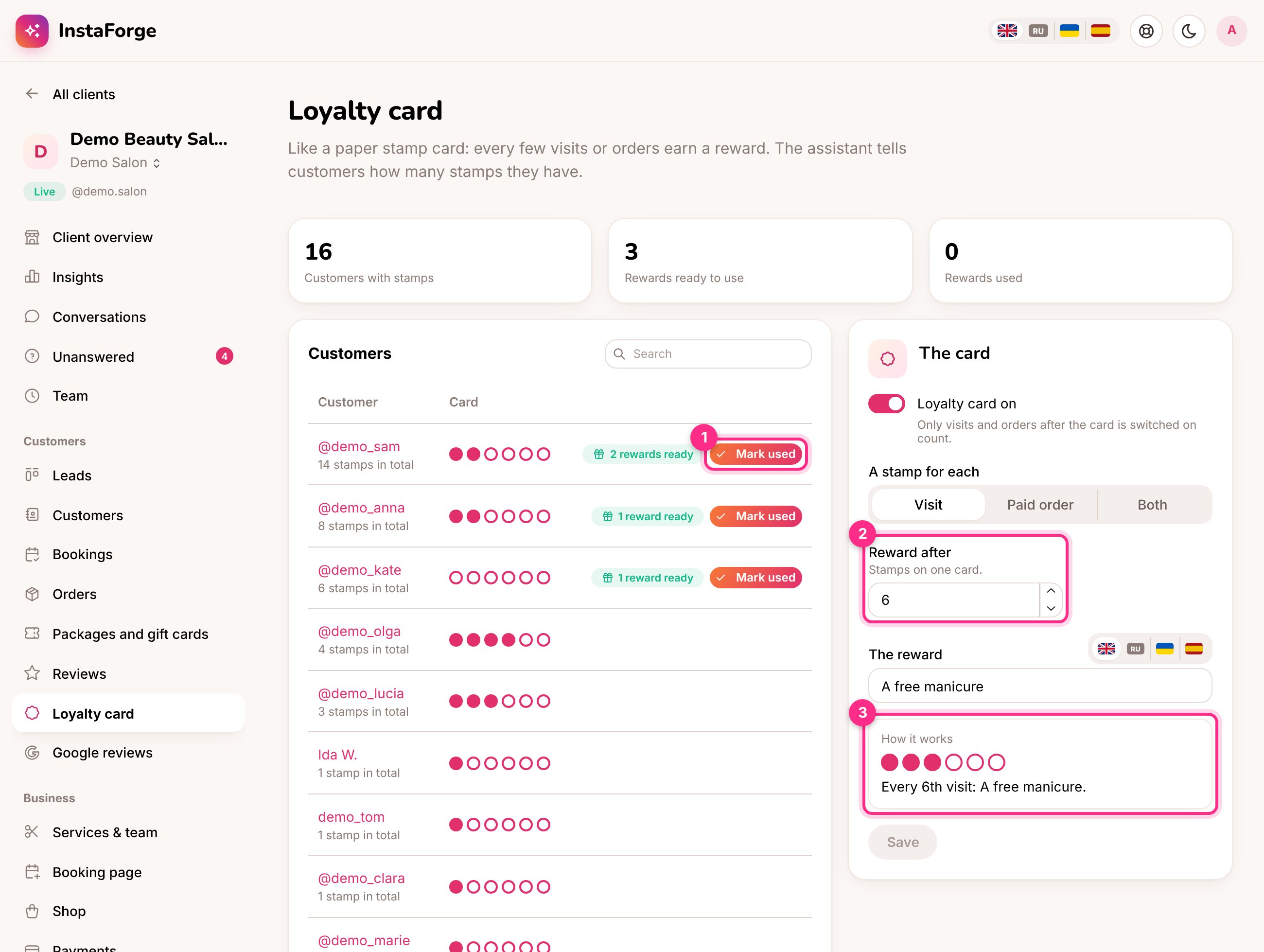 ## Set it up
Open **Customers → Loyalty card** in the assistant's menu (admins and editors).
A **visit** (an appointment that wasn't cancelled or marked as a no-show, once its time has passed), a **paid order** from the shop, or **both**.
For example 6 (2). From 2 to 50.
For example "A free manicure", in each language your customers write in.
Only visits and orders from that day on count, so nobody starts with a full card.
## What customers get
The assistant knows each customer's card. When someone asks "how many stamps do I have?" it answers, and when a reward is ready it mentions it at a fitting moment, for example while they book their next visit.
## Give a reward
The list shows everyone with stamps, with a row of stamps for the current card. Customers with a full card are at the top, marked **reward ready**.
When the customer gets their reward, click **Mark used** (1). One full card is taken off, and the stamps they collected on top of it stay.
Business owners can do this too from their [portal](/client-portal), for example at the counter, as long as the portal shows them Customers.
It doesn't count. Appointments count once their time has passed, unless they were cancelled or marked as a no-show.
The assistant stops mentioning it and the page shows the card is off. Customers keep their stamps for when it's switched back on.
Yes, Loyalty card is one of the [features](/running-the-agency/agencies#assistant-limit-and-features) the platform owner can turn off per agency.
Yes. A connected [AI agent](/running-the-agency/ai-agents) can show who has a reward ready, mark one used, and change the card.
This documentation is built and hosted on [Mintlify](https://mintlify.com), a developer documentation platform.
## Set it up
Open **Customers → Loyalty card** in the assistant's menu (admins and editors).
A **visit** (an appointment that wasn't cancelled or marked as a no-show, once its time has passed), a **paid order** from the shop, or **both**.
For example 6 (2). From 2 to 50.
For example "A free manicure", in each language your customers write in.
Only visits and orders from that day on count, so nobody starts with a full card.
## What customers get
The assistant knows each customer's card. When someone asks "how many stamps do I have?" it answers, and when a reward is ready it mentions it at a fitting moment, for example while they book their next visit.
## Give a reward
The list shows everyone with stamps, with a row of stamps for the current card. Customers with a full card are at the top, marked **reward ready**.
When the customer gets their reward, click **Mark used** (1). One full card is taken off, and the stamps they collected on top of it stay.
Business owners can do this too from their [portal](/client-portal), for example at the counter, as long as the portal shows them Customers.
It doesn't count. Appointments count once their time has passed, unless they were cancelled or marked as a no-show.
The assistant stops mentioning it and the page shows the card is off. Customers keep their stamps for when it's switched back on.
Yes, Loyalty card is one of the [features](/running-the-agency/agencies#assistant-limit-and-features) the platform owner can turn off per agency.
Yes. A connected [AI agent](/running-the-agency/ai-agents) can show who has a reward ready, mark one used, and change the card.
This documentation is built and hosted on [Mintlify](https://mintlify.com), a developer documentation platform.