

Night and weekend mode
Some teams want to answer customers themselves during the day and let the assistant cover nights, days off and holidays. Choose Only when the team isn’t working at the top of the Behaviour page.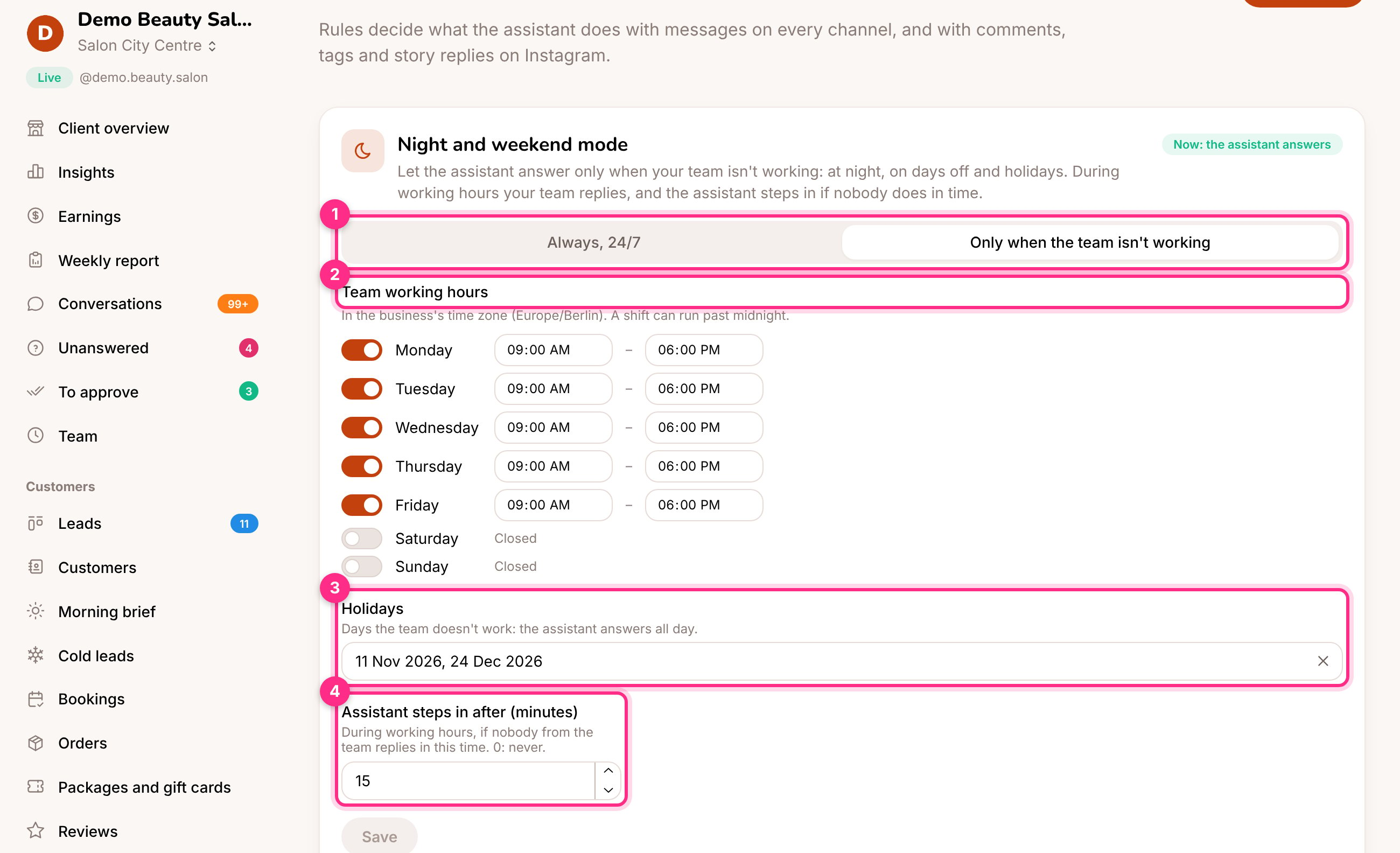
Who answers (1), the team's hours (2), holidays (3) and the wait before the assistant steps in (4)
- Who answers (1): Always, 24/7 (the default) or Only when the team isn’t working. The badge at the top right shows who answers right now.
- Team working hours (2): per day, in the business’s time zone. The first time, they’re copied from the opening hours. A shift can run past midnight, such as 22:00 to 06:00.
- Holidays (3): on these dates the assistant answers all day.
- Assistant steps in after (4): during working hours a new message is left for the team, and the people who can reply get an alert (A message waits for the team during working hours on the Alerts page). If nobody replies within this many minutes, the assistant answers after all, so the customer doesn’t wait. Set 0 to leave it to the team only.
This covers direct messages and the website chat. Comments, comment campaigns and story mentions keep following their rules around the clock. If a person replies in the chat or turns the assistant off for it, the assistant stays out of it.
Asking for a person
Every new assistant has the rule Talk to a person. When someone asks for a human, a manager or a call back, the assistant sends the hand-off message, stops answering in that chat and tells the team. Only a clear new request to book, while the person still waits for the team’s first reply, gets the booking questions and free times (see Take over a chat). The rule knows phrases in English, Russian, Ukrainian and Spanish, whatever language the assistant speaks, such as “speak to someone”, “I want a manager” and “call me back”. It looks for whole phrases, so “a class for two people” or “price per person” is still answered as a question. When someone asks in other words, for example “can someone from reception get back to me?”, the AI recognises it and hands the chat over the same way. This works in direct messages, story replies and the other private chats, as long as a hand-off rule is on. Comments are never handed over. The same goes for a message, order or complaint for the team, and for a phone number or email left for a call back, such as “can Dr Morgan ring me on 07700 900123?”. Questions about prices, opening hours or policies, a refund policy included, are still answered from the knowledge. Asking to move or cancel an appointment is done in the chat, not handed over. This works in the middle of a flow too: “Could someone from the studio talk to me?” or “can u at least pass my number to someone” ends the questions and hands the chat over, instead of asking the next question or starting the booking again. The answers given so far are kept, a phone number in the message also answers the flow’s phone question, and the team gets the usual hand-off alert. A message that asks someone from the team to write or call before any flow has started, such as “can someone from the team message me to book?”, is handed over as well rather than starting the booking questions. The assistant never tells a person it can’t pass something on or put them through while a hand-off rule is on. If the AI still writes “I can’t pass this to the team”, the reply is not sent and the chat is handed over. If it says it passed something on (“I’ve asked the team to message you here”, “I’ll pass it on to them”) and no hand-off happened, the reply is not sent either and the chat goes to the team, who can really do it. “The team will contact you” counts the same way, unless the knowledge describes it as the business’s process or a request form is collecting the person’s details. A general sentence about how the business works, such as “we contact you within 24 hours after you apply”, is no claim. In a request form the claim is only left out and the questions go on, because the finished request reaches the team. An offer such as “I can pass this to the team if you like” or a question is fine. When nobody from the team is there, the hand-off message says so in one text, such as “I’ve passed your message to the team. Nobody from the team is in right now. They’ll reply here when they’re back on Mon 19 Oct 10:00.” It never promises a reply “shortly” at the same time. With night and weekend mode on, the team’s hours decide when they’re back, holidays included. Otherwise the opening hours set for bookings decide, and an assistant without bookings says nothing about times. If you wrote an Out-of-hours reply under When nobody answers, it’s used in place of the “Nobody from the team is in” sentence. A hand-off message of your own is kept with the note after it, unless it promises a quick reply. A phone number or email the person typed in the message that hands the chat over is kept on them when Remember each person is on: it shows next to the conversation and on their card under Leads. The chat becomes a new lead either way. Existing assistants whose rule still has its original word list get the new phrases on the next update. A rule you edited keeps your words.Annoyed customers
When a customer seems annoyed with the assistant, it says sorry, stops answering in that chat and hands it to the team with an urgent alert (A customer seems annoyed with the assistant (urgent)). It’s on for every assistant. To switch it off, turn off Hand annoyed customers to the team (1) under When nobody answers.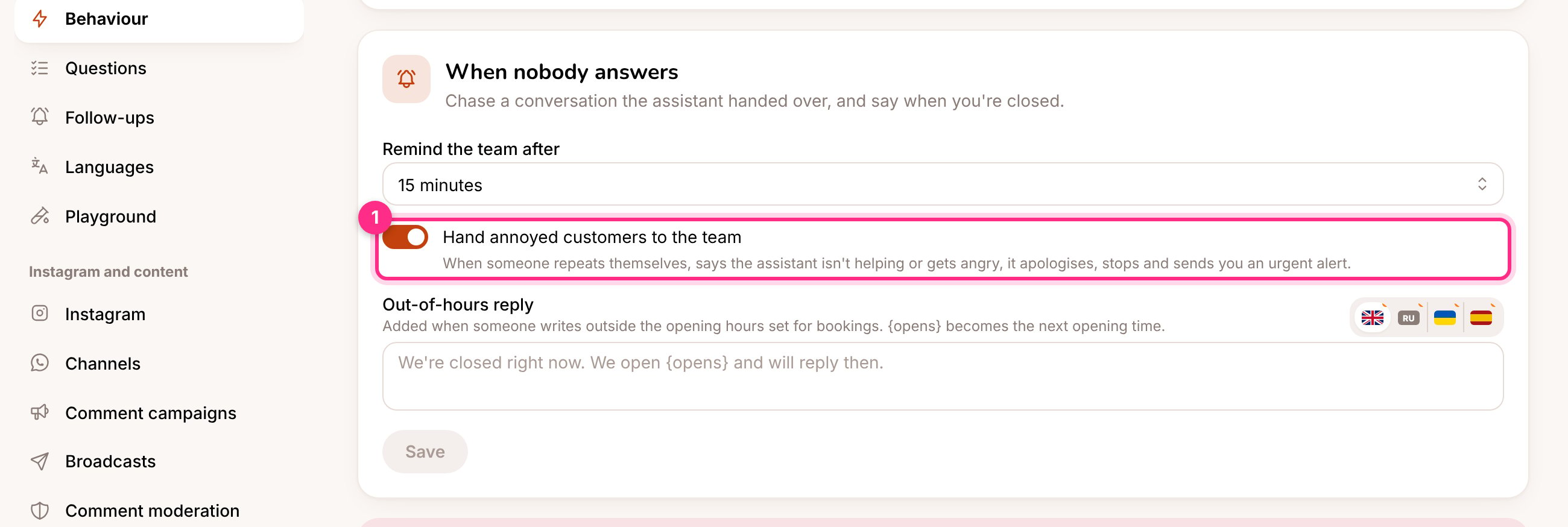
When nobody answers: hand annoyed customers to the team (1)
Two points or more hands the chat over. Phrases are recognised in English, Russian, Ukrainian, Spanish and Hebrew, whatever language the chat is in. The first message counts too, also when the assistant answers it only after the customer gives consent, so someone who opens with “It was APPALLING!!!” is handed over at once. A few phrases only count once the assistant has replied to something more than a hello: “Are you a bot?” or “not a bot, right?” as an opening line, or right after “hi” and the welcome message, is curiosity, and “I already said” or “the same again” can’t be about this chat yet. A pleased customer is not annoyed: “Seriously, the best croissants!!” or “Amazing!! Thank you” has no points for “seriously”, capitals or ”!!”, while annoyed words still count next to a “great” said in sarcasm. Words like “refund” or “complaint” on their own don’t count, so “What is your refund policy?” gets an answer. Short acronyms and the names of the business’s own services and products don’t count as capitals, so “Is the LASH LIFT free on Monday?” is not shouting. Capitals and ”??” in two messages in a row are not enough on their own: one of the two messages also has to use annoyed words.
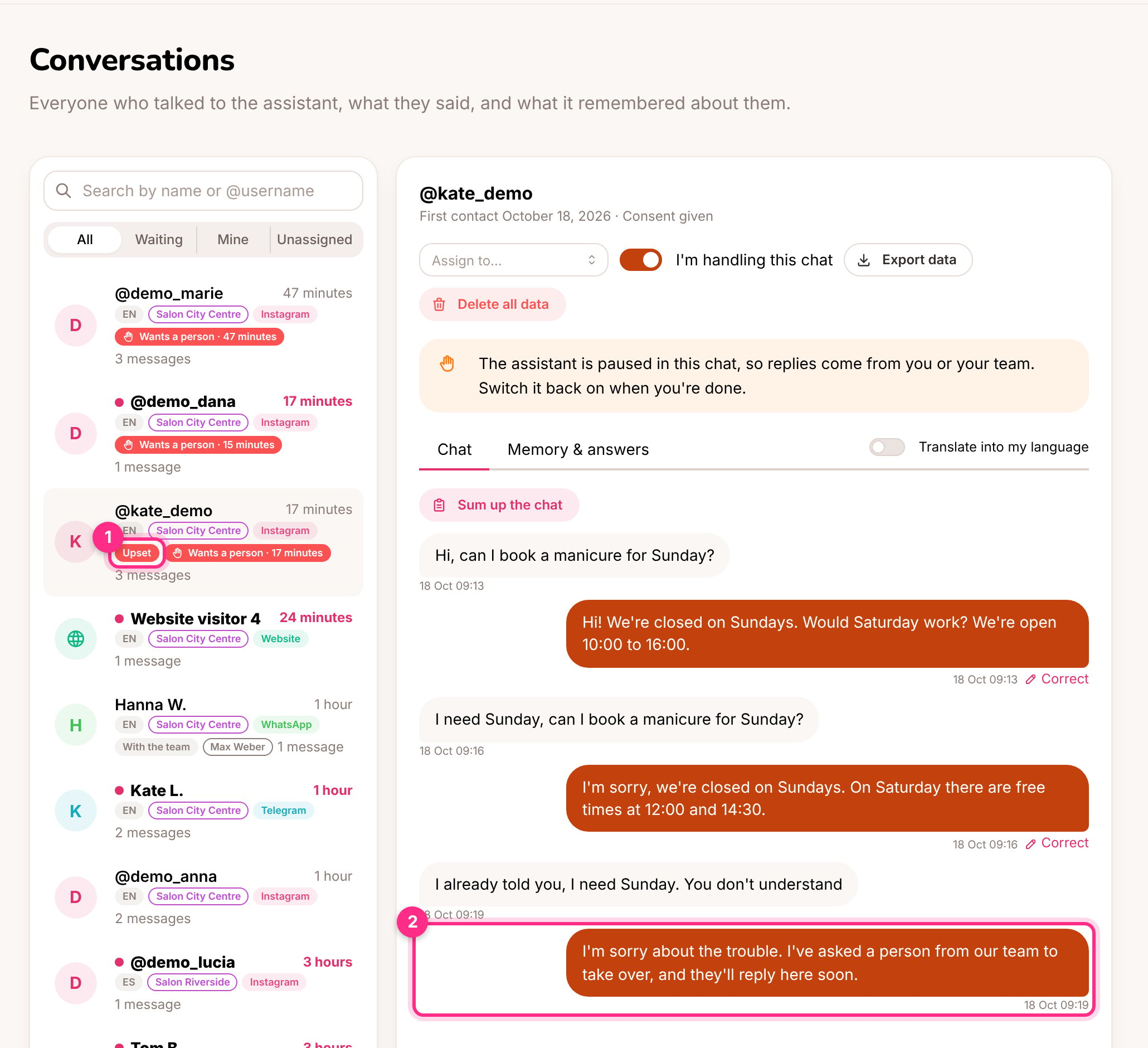
An annoyed customer: the Upset badge (1) and the apology the assistant sent before handing over (2)
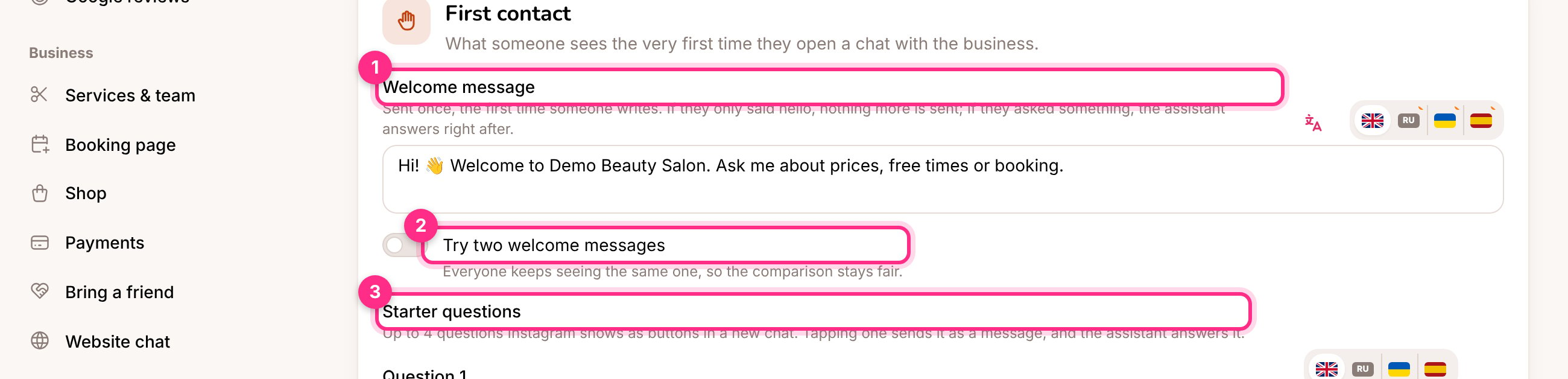
Welcome message (1), welcome test (2) and starter questions (3)
First contact
- Welcome message (1): sent once, the first time someone writes. If they only said hello, nothing else is sent; if they asked something, the answer follows. When a flow starts on the first message, the flow greets new people itself and the welcome is sent only if that flow doesn’t start (for example when a rule answers the first message), so nobody gets two greetings in a row.
- Try two welcome messages (2): half of new people get each version. Each person keeps seeing the same one, and Insights shows which brought more bookings.
- Starter questions (3): up to four questions Instagram shows as buttons in a new chat, such as “Prices”, “Book a time”, “Where are you?”. Tapping one sends it as a message.
Rules
Each rule says: when this happens (and the message matches), then do this.
For comments you can reply publicly, in a private DM, or both (a short public reply such as “Sent you a DM 📩” while the full answer goes to Direct).
A public reply is written only from the knowledge base and the person’s earlier public comments. Their private messages, what the assistant remembers about them and their answers to flows stay out of it, so a public reply can never repeat a phone number or a personal detail shared in Direct. Replies in a private DM still use all of it.
A public reply is posted only when every link, website, email, @handle and phone number in it comes from the knowledge base, the business’s own name and Instagram account, or the instructions you gave the assistant (its prompt, or the rule’s instructions). A link or contact the commenter wrote doesn’t count, since anyone can write a comment. Otherwise nothing is posted under the post, and the question is saved as unanswered for the team.
A private message with nothing the assistant can read, such as an Instagram heart, a sticker on WhatsApp or Telegram, a shared post or reel, a video, or something Instagram or WhatsApp doesn’t pass on to apps, gets one short reply asking the person to write their question. Nothing goes to the AI for it. Voice messages and photos are read on Instagram, Messenger, WhatsApp and Telegram when the assistant’s AI can do that.
Rules are checked from top to bottom and the first match wins. Put specific rules (keywords, patterns) above general ones.
Rules and flows
A message goes through them in this order:- A flow that is already running gets it first. A question asked on the side is answered inside the flow, and the flow carries on.
- Rules with keywords, a pattern or First message.
- Flows that start: on the first message, on keywords, on a pattern or on a meaning.
- Always rules.
A pattern (regular expression) can be up to 300 characters, and an assistant can have up to 25 pattern rules, since each one is tried on every message. Patterns that would take too long or too much memory are refused when you save them.
Examples
Thank people who mention you in their story
Thank people who mention you in their story
When: Story mention, always. Then: Send a fixed message:
Thank you for the mention, {{username}}! 💛Never discuss a sensitive topic
Never discuss a sensitive topic
When: Direct message containing “complaint”, “lawyer” or
refund*. Then: Hand over to a human.Push a promotion when people ask about prices
Push a promotion when people ask about prices
When: Direct message containing
price* or “how much”. Then: Answer with AI, with the extra instruction “Mention our 10% discount for first visits”.